


8K video, replaceable lenses and an improved ultra-low light mode – Insta360’s X5 flagship is an excellent social media action camera for divers
Review by Mark 'Crowley' Russell
Whether it be taking photographs or making videos, I am not great with cameras. All the technology in the world can’t compensate for a poor shot, but the Insta360 X5 latest flagship 360-degree action camera makes poor shot-taking virtually impossible.

Filming in 360° is accomplished by two back-to-back wide-angle lenses, which are stitched together by the in-camera software. This means the X5 captures (almost) everything that happens around you, and the editing software enables you to select what you actually want to see in the footage afterwards.
This essentially means that you can’t miss the whale shark that swam behind you when you were busy taking photos of the nudibranch. Well, you might not actually have seen the giant fish, but you can still post footage of it to your social media pages.
I took one with me during a recent trip to Sharm El Sheikh, to see whether or not it would turn me into a fantastic videographer, or permanently consign my footage to the recycle bin.
What’s in the box?
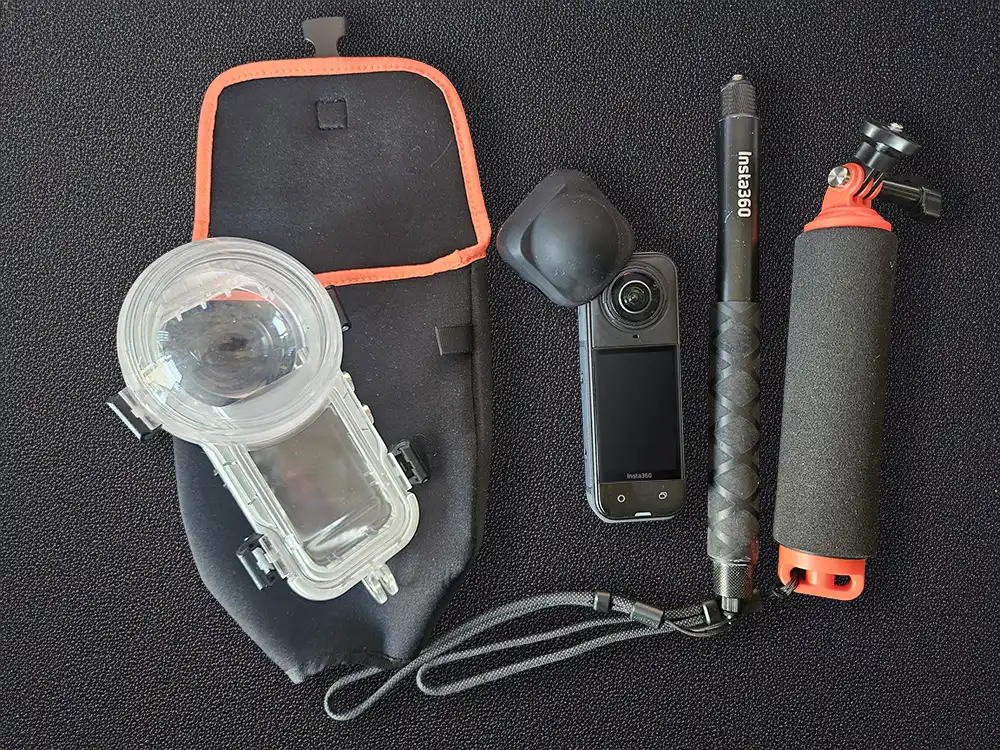
The X5 is a compact, dual-lens 360-degree action camera designed to capture immersive video and stills that can be reframed in post-processing, and aimed squarely at content creators who value flexibility and ease of use rather than high-end photography.
The X5 can shoot up to 8K 360-degree video at 30fps, with lower-resolution options available for those who prefer higher frame rates or need longer battery life. The camera is available independently or as a series of bundles, from skiing and snowboarding to motorcycling and, of course, scuba diving.
The Insta360 Invisible Dive Bundle comprises the camera, lens cap, Insta360’s Invisible Dive Case and a 114cm-long Invisible Selfie Stick, floating hand grip and wrist straps. Additional extras to consider include the replacement lens kit – a first for the Insta360 line, and the Invisible Dive Case Pro, which we’ll come to later.
Upgrades from the X4 include a larger sensor, better low-light capabilities and extended battery life – up to a claimed 180 minutes at 5.7K30fps over the 135 minutes of the X4, and up to 90 minutes at 8K.
The X5 is waterproof to 15m without a housing (the X4 was rated to 10), but both need the Invisible Dive Case for proper underwater use.
One significant upgrade the X5 has from the X4 is the user-replaceable lenses, a distinct advantage for a product that is, by design, subject to a bit of rough and tumble.
The Insta360 Invisible Dive Bundle

The Invisible Dive Case is sturdy and simple to use, with four small clips that are actually quite reassuring once closed, and I never once had any concerns about water ingress.
The X5 is operated by four buttons and a touch screen; the case reduces this to just two buttons, but it’s relatively easy to figure out how they work, even if, as in my case, you haven’t read the instructions – there are only so many combinations of random button presses you can make.
Selfie sticks have become a social media essential, and while the Insta360 and its housing don’t strictly speaking need it, the X5’s best shots are made with it.
The selfie stick is automatically removed from the footage, enabling you to capture sweeping third-person perspectives of yourself that would be impossible with a conventional action camera – it’s almost like having a drone hovering around you, which makes for some excellent video.
Both the case and the selfie stick are designed to disappear from the final footage when the camera stitches its dual-lens images together. I found, however, that light conditions can generate a visible reflection of the stick in some circumstances, and the stitching is sometimes noticeable, depending on the angles you’re working with when you reframe your footage.
With or without the Invisible Dive Case, there is some distortion visible around the edges of the frame, which is increased by the addition of the housing. This is, given the nature of camera, not a huge problem, and reframing the footage can eliminate most of it.
The case is also prone to refraction from strong sunlight – very noticeable under the blue skies of Egypt – which merits a look at the Pro version of the case (below), but I didn’t find it to be a huge problem – and this is a camera for social media, not Hollywood.
The Invisible Dive Case Pro

The Invisible Dive Case Pro is made from ‘professional grade’ material, and it is definitely better for underwater imagery than the regular case. It is, however, fairly bulky, much heavier out of the water and much more buoyant under it.
It is shipped with a weighted rod, which eliminates most of the positive buoyancy, but you need to keep a firm grip on it nonetheless, and you need to make sure you yourself are correctly weighted.
An original marketing blurb from Insta360 did, in fact, recognise the Pro cases’ extra bulk and said ‘consider taking the Invisible Dive Case on holiday and use the Dive Case Pro when diving from home.’
I think there’s no need to go quite that far, and I travelled comfortably with both cases, but whether or not you purchase one will depend on your intended use.
The footage is sharper and less prone to distortion and light refraction than it is with the regular housing, so if you’re after longer, more cinematic footage, or are just something of a perfectionist, then the Pro case might be a worthwhile investment, but for short social media posts, it’s not essential.
The Pro case is priced at £111.99 as an individual item, which makes it just £12 more expensive than the regular Invisible Dive Case, and the Pro Dive Bundle is also just £12 more than the regular dive bundle, so it’s definitely an option if you’re buying everything from new.
Shooting footage underwater

I used the X5 primarily for video, mostly at the default 5.7K 30fps. At this setting, battery life is excellent. The camera easily lasted a 70-minute dive with continuous operation, and recharging from a power pack during the surface interval kept it topped up all day.
Switching to 8K video drains the battery rapidly – the claim is up to 90 minutes, which isn’t far off but I was definitely in the red zone after a 60-minute dive.
It also generates extraordinarily large files, so for most underwater use, 5.7K strikes a far better balance between quality, file size and battery life.
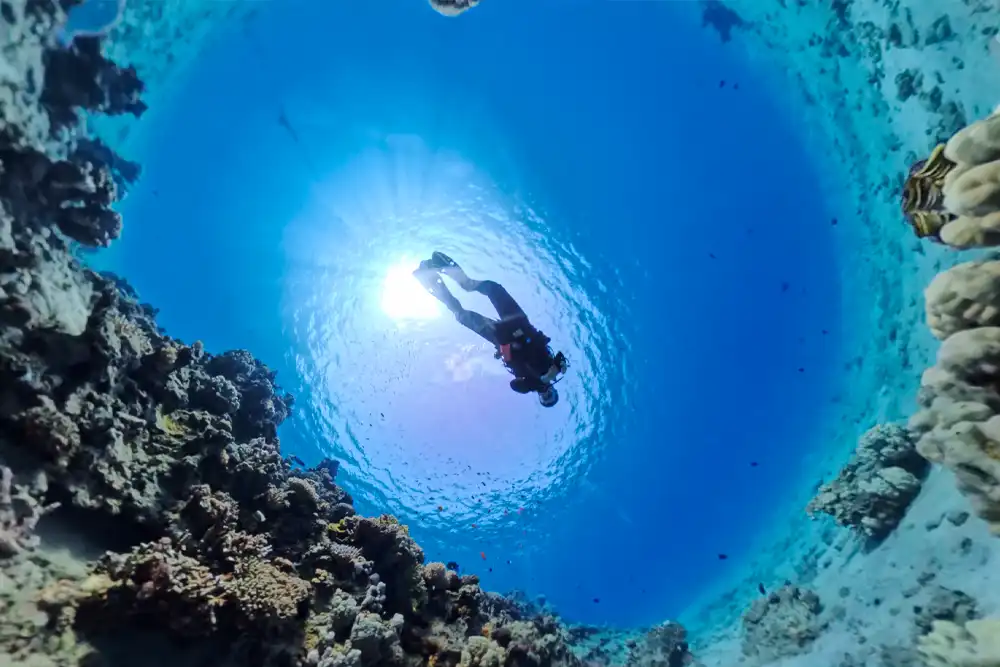
Barring the inevitable edge distortion, the video quality is superb. Image stabilisation is extremely effective, and the footage remains smooth even when your underwater movement is less than smooth.
The automatic ‘Aquavision’ colour-correction feature is also excellent; processing on your smart device gives you four choices to select from to get the best possible version – no white balance or filters are required; the X5 produced vibrant, natural-looking colour on shallow reefs I spend most of my time on.
Although video is the X5’s primary strength, it performs well in capturing stills – better, I think, than some of its competitors – but like all action cameras, it’s not going to replace a decent compact camera or DSLR for serious underwater photography.
It’s possible to shoot flat images, but the post-processing reframe of 360° is a great advantage for people like me, who know what they want to see, but have difficulty pointing the lens in the right direction.
One of the pleasant surprises with the X5 is how usable it is underwater without constantly reaching for physical buttons.
Gesture control and Insta360’s ‘wiggle’ control both work reliably below the surface, allowing you to start and stop recording with simple movements. This is particularly useful when using the selfie stick (and probably also for thick gloves), and it reduces task loading during the dive.
Menus are clear, the companion app is fairly intuitive, and the overall experience feels well thought out for divers who don’t want to fight their camera while trying to enjoy the reef.
AI editing suite – clever, but not perfect
There are two editing suites – the Insta360 app for smart devices and Insta360 Studio for desktops. Both are fairly straightforward to use, but the app shines for its AI-assisted editing suite.
Assemble your shots, ask it to create a video and voila – you have one. The AI will pick out the best moments from longer clips, add filters and captions and provide you with a perfect social media snippet.
It works well, but with a caveat in that the AI tends to focus too much on the user, rather than the surrounding environment. For divers who want to showcase marine life and landscapes rather than themselves, this means some manual intervention is still required.
For longer and more refined videos, the desktop suite is quite easy to use. It doesn’t have the full AI-assisted video creator of the app, but it does have some useful AI utilities, such as an object/person tracker and a bunch of fun effects and transitions.
Once you’ve mastered the art of keyframes – which does take a little while – creating movement through the 360-degree action is fairly straightforward.
Insta360 X5 verdict

The Insta360 X5 Dive Bundle proved to be a rather enjoyable experience, and it’s really easy to use. Video quality is excellent, auto colour correction and image stabilisation are impressive, and battery life at sensible resolutions easily covers long recreational dives.
There are compromises. Some edge distortion from the dive case is unavoidable, and 8K video comes with a significant battery drain.
The biggest selling point of the Insta360 X5 is the ability to reframe everything in post-production. You can enjoy your dive without having to concentrate on settings or worrying about framing the perfect shot.
It’s not going to win you awards for cinematography, but as a tool for Instagram diving, however, it’s almost perfect.
MSRP Insta 360 X5:
Standard Bundle: £519.99
Invisible Dive Bundle: £670
Invisible Pro Dive Bundle: £682
www.insta360.com
Related articles
